
Accordion Menu Expression Web Addin2.1.4.0 - Download
You'll be able to download in few seconds.
Publisher Description
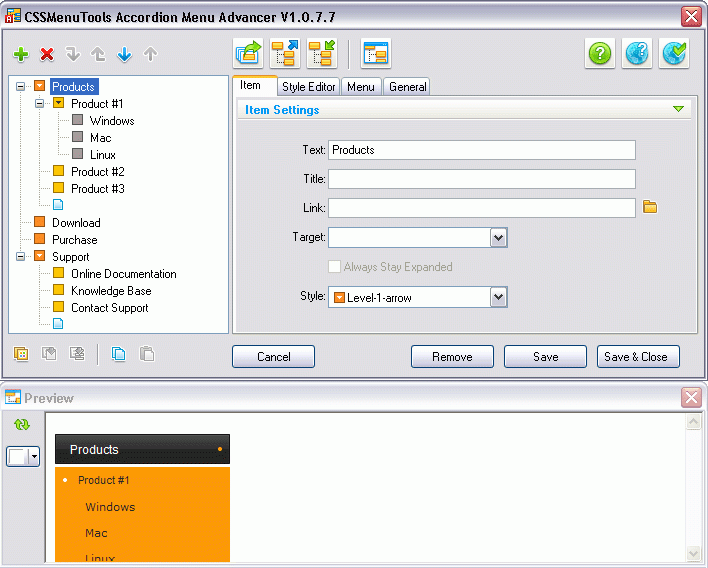
Do you want a great looking accordion menu on your website even faster and easier?
Easy-to-use add-in for Expression Web 4 and Front Page 2003 is an advanced tool that creates Accordion CSS menus on your website in easy way. Accordion Menu Advancer has an intuitive GUI and extensive library of free professionally designed templates. This tool generates the light-weight, cross-browser, SEO-friendly multi-level CSS menus. It saves your time as it does not require any css/javascript hand coding. Full control on all aspects at menu creation guarantees perfect results. With our live preview function you always can see what you get. You can use great templates (menu styles) from our library or you can quickly make fully custom menu. Extended color management system allows you to quickly customize your menu palette. Integrated Search Engine Optimization control gives you power to improve your page rank and generate spider-friendly pages.
About Accordion Menu Expression Web Addin
This XML/CSS Tools program is available in English. It was last updated on 29 September, 2026. Accordion Menu Expression Web Addin is compatible with the following operating systems: Windows.
The company that develops Accordion Menu Expression Web Addin is CSSMenuTools. The latest version released by its developer is 2.1.4.0.
The download we have available for Accordion Menu Expression Web Addin has a file size of 1.0 MB. Just click the green Download button above to start the downloading process. The program is listed on our website since 2012-11-15 and was downloaded 0 times. We have already checked if the download link is safe, however for your own protection we recommend that you scan the downloaded software with your antivirus. Your antivirus may detect the Accordion Menu Expression Web Addin as malware if the download link is broken.
How to install Accordion Menu Expression Web Addin on your Windows device:
- Click on the Download button on our website. This will start the download from the website of the developer.
- Once the Accordion Menu Expression Web Addin is downloaded click on it to start the setup process (assuming you are on a desktop computer).
- When the installation is finished you should be able to see and run the program.
Program Details
System requirements
Download information
Pricing
Version History
version 2.1.4.0
posted on 2012-11-15
Script engine cross-browser compatibility improved.
version 1.0.4
posted on 2009-11-23
Disclaimer
External Download
We do not host Accordion Menu Expression Web Addin on our servers. We did not scan it for viruses, adware, spyware or other type of malware. This app is hosted by the software publisher and passed their terms and conditions to be listed there. We recommend caution when installing it.
The external download link for Accordion Menu Expression Web Addin is provided to you by apps112.com without any warranties, representations or guarantees of any kind, so access it at your own risk.
If you have questions regarding this particular app contact the publisher directly. For questions about the functionalities of apps112.com contact us.
